
Goal Seek tutorial workbook
Excel binary workbook (.xlsb). The housing mortgage and term loan examples from this tutorial, set up for Goal Seek.
Enter your details and we will email you the workbook.
Loading the form…
The form did not load. Send us an enquiry and we will email you the workbook.
Goal Seek finds break-even points and answers tailored what-if questions in Excel. This tutorial applies it to two loan decisions.
When you know the result you want from a formula but not the input that produces it, Goal Seek back-solves the problem. It changes one input cell until the formula that depends on it returns the result you asked for.
How to use Goal Seek
Goal Seek needs a working base model: inputs and formulas already set up in the worksheet. Open it from the Data tab, under What-If Analysis. It asks for three things:
- Set cell: the output cell
- To value: the value you want the output cell to reach
- By changing cell: the input cell Goal Seek may change
The set cell must contain a formula. The by changing cell must contain a value, not a formula. Select the set cell, type the target in To value, then select the by changing cell and click OK.
Excel then recalculates and offers the result. Accept it to write the solved value into the worksheet, or cancel to return the worksheet to how it was.
Learn this in a room
Best Practice Project Finance Modelling
Build and sensitise robust cashflow models from scratch, faster in Excel. Hands-on, practitioner-led, in person or online. See dates and book your place.
Iterations in Goal Seek
Goal Seek works by numerical iteration, so it does not always find the exact answer. It may stop when it is close enough, or fail to find the answer you want.
Goal Seek example 1: a mortgage term
Figure 1 shows the inputs for the monthly payment on a typical housing mortgage.
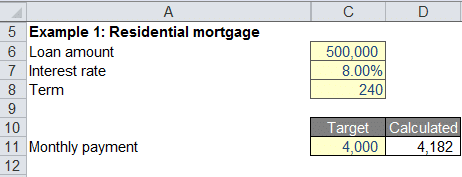
The calculated monthly payment is A$4,182.20. You are the mortgage analyst at a bank, and your client wants to pay A$4,000 a month instead.
How does the loan term change if the monthly payment is A$4,000?
- Add a cell E10 and label it Delta
- In E10, enter a formula for the difference between the target payment and the calculated payment (A$4,000 − A$4,182.20 = −A$182.20)
- Open Goal Seek from What-If Analysis on the Data tab
- Set cell: E10
- To value: 0
- By changing cell: C7, the loan term
- Goal Seek solves C7 at 240 months
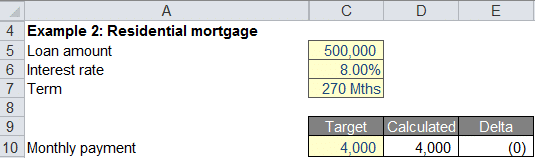
You can solve for the loan amount (C5) instead of the term to hit the same target.
Goal Seek example 2: term loan pricing
Now you are the analyst at a bank pricing a term loan. The calculation tab derives the repayments and the debt service coverage ratio (DSCR). The calculated average DSCR is 1.96x and the target is 2.00x.
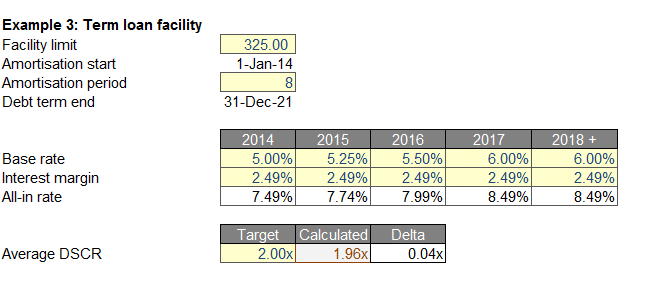
What interest margin gives an average DSCR of 2.00x?
- Add a cell E26 and label it Delta
- In E26, enter a formula for the difference between the target average DSCR and the calculated one (2.00x − 1.96x = 0.04x)
- Open Goal Seek from What-If Analysis on the Data tab
- Set cell: E26
- To value: 0
- By changing cell: C22, the interest margin
- Goal Seek solves C22 at 2.49% a year
To reach an average DSCR of 2.00x, the loan needs an interest margin of 2.49% a year.
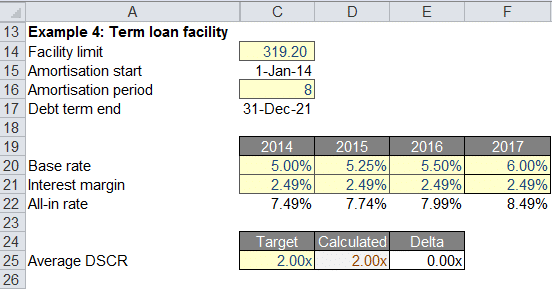
The same steps can change the facility limit (C14) instead:
- Set cell: the delta cell
- To value: 0
- By changing cell: C14, the facility limit
- Goal Seek solves C14 at A$319.20 million
Goal Seek questions
What is Goal Seek used for?
Finding the input that makes a formula return a target, without trying values by hand. Common uses are break-even analysis and solving for a loan term, interest margin or facility limit that meets a target payment or ratio.
Why does the set cell need to contain a formula?
Goal Seek changes an input until a formula that depends on it returns your target. If the set cell holds no formula driven by the by changing cell, there is nothing to solve.
Why doesn’t Goal Seek always find an exact answer?
It works by numerical iteration, not algebra. It usually stops when it is close enough, but sometimes it does not reach the value you want.
What is the difference between Goal Seek and a data table?
Goal Seek solves one input for one target output. A data table shows how an output changes across a range of inputs at once, which is better when you want the full sensitivity, not one solved answer.