
Maximum debt limit tutorial workbook
Excel binary workbook (.xlsb). A project with irregular cash flows, the debt limit solved for a 1.50x DSCR and the Goal Seek macro button.
Enter your details and we will email you the workbook.
Loading the form…
The form did not load. Send us an enquiry and we will email you the workbook.
This tutorial solves the maximum debt limit for a target debt service coverage ratio (DSCR) in a project finance model: the largest debt that a given cash flow available for debt service (CFADS) profile can support.
First, the principal repayments are set to a target DSCR, as Figure 1 shows and the workbook sets out. Our debt sculpting to target DSCR without VBA tutorial covers this layout in detail, sculpting the repayments in every period to a uniform DSCR of 1.50x. Here we use the CFADS to solve for the maximum debt limit. The tutorial covers:
- Why and when to use this method
- The benefits and limits of Goal Seek
- Running the steps as a VBA macro
Why use Goal Seek for debt sizing?
In project finance it is common to solve for an indicative maximum debt limit that a project can support.
A model can do this in several ways. You can adjust the debt limit by hand until the closing debt balance at maturity is zero, or use Excel’s Goal Seek to do the same thing quickly.
Goal Seek is built into Excel. Use it when you know the result you want from one formula but not the input that gives it.
Learn this in a room
Advanced Project Finance Modelling
Debt sizing, covenant monitoring, DSRAs and integrated three-way statements. Hands-on, practitioner-led training, in person or online. See dates and book.
Benefits and limits of Goal Seek
Goal Seek is simple, because it needs only three inputs:
- Set cell: the cell holding the result you want
- To value: the result
- By changing cell: the input
Its limits are real, though:
- It cannot change two or more inputs at once
- It gives one answer, even for formulas with several
- It only works if the set cell moves towards the target with each iteration
- The set cell and the by changing cell must be on the same sheet
Goal Seek debt sizing worked example
The workbook has a project with irregular cash flows. It solves for the maximum debt limit that gives a DSCR of 1.50x in every repayment period.
Step 1: test by hand
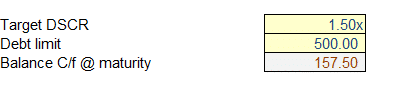
Start with a limit of $500 million. The CFADS is not enough to repay the loan, so $264 million is still outstanding at maturity (C19). You would have to keep typing in lower limits until C19 is zero.
Step 2: set up Goal Seek
Goal Seek does the same testing for you, finding the debt limit that brings the balance at maturity to zero:
- Set cell: closing debt balance at maturity
- To value: 0
- By changing cell: debt amount
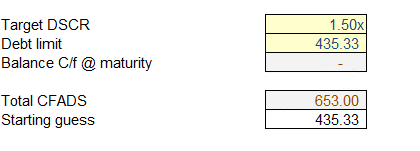

To solve for the maximum debt limit in C21, Goal Seek has to work down from a starting number above the answer. Any limit below $313.86 million leaves a zero balance at maturity, so Goal Seek has nothing to solve. The workbook therefore uses a starting guess (C24) of $435 million.
Building the Goal Seek macro in VBA
A macro can run Goal Seek at the click of a button in the model.
Step 1: record the macro
Recording a macro stores the commands you perform in Visual Basic for Applications (VBA). To record this one:
- Start recording a new macro
- Set the debt limit (C21) to the starting guess (C24)
- Run Goal Seek from Data, What-If Analysis, as in the previous section
- Stop recording
Step 2: replace cell references with named ranges
So that the macro keeps working when a row or column is inserted, every range in the code should be a named range, not a direct cell reference. Create these names:
- Actual_CBal: closing debt balance at maturity (C19)
- Debt_Limit: debt amount (C21)
- Starting_Guess: starting guess (C24)
Then replace every cell reference in the code with them, as Figure 4 shows.

Step 3: add a button for the macro
Insert a shape in Excel, then:
- Right-click it, choose Edit Text and label it
- Right-click it again and choose Assign Macro
- Select the macro and click OK
Clicking the button now runs the Goal Seek macro.
Drawbacks of a Goal Seek macro
- It relies on the user knowing when and how to run the macro
- Not every institution allows macros
- It makes the model less transparent
- It increases audit costs
- It cannot readily be used with data tables in scenario analysis
In a project finance transaction it helps to know the maximum debt a target DSCR supports, as an estimate of the debt funding the project’s cash flows can carry. This tutorial has calculated it for a fixed target DSCR, with VBA automating a process Goal Seek can also run by hand.
Goal Seek macro questions
What is the maximum debt limit and why does it matter?
The largest debt a project’s cash flows can support while meeting a target DSCR in every repayment period. It gives lenders and sponsors an indicative ceiling on the debt a transaction can carry.
What are the main limits of Goal Seek for debt sizing?
It changes one input at a time and gives one answer even where there are several. It also only works if the output moves towards the target as the input changes. The set cell and the by changing cell must be on the same sheet.
Why automate Goal Seek with a VBA macro?
So the same debt sizing runs at the click of a button instead of by hand every time an assumption changes. It suits a process that is proven and repeated often, at a cost in transparency and audit time.
Why does Goal Seek need a starting guess above the answer?
Any debt limit below the answer leaves a zero balance at maturity, so Goal Seek sees no difference to close. Starting above the answer gives it a balance to bring down to zero.