
NPV tutorial workbook
Excel binary workbook (.xlsb). The project NPV and equity NPV from this tutorial, calculated with XNPV() and NPV() side by side.
Enter your details and we will email you the workbook.
Loading the form…
The form did not load. Send us an enquiry and we will email you the workbook.
Net present value (NPV) uses the time value of money to appraise long-term projects and investments. Calculating it without Excel’s built-in functions makes every step visible, so the result is easier to check and less likely to hide an error.
What is net present value (NPV)?
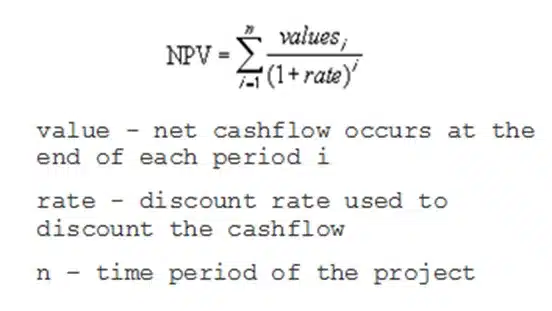
NPV is the sum of the present values (PVs) of the cash flows expected from a project or investment. It can be written as:
NPV=Σ Valuei(1 + Rate)i
- Valuei: the net cash flow at the end of period i
- Rate: the discount rate applied to each cash flow
- i: the time period of the project
Project finance models usually calculate two NPVs, each from a different point of view.
Project NPV
The project’s future operating cash flows, less the initial capital cost.
Equity NPV
The distributions to equity, less the initial equity investment.
Learn this in a room
Best Practice Project Finance Modelling
Build and sensitise robust cashflow models from scratch, faster in Excel. Hands-on, practitioner-led, in person or online. See dates and book your place.
Interpreting NPV for an investment decision
- NPV above zero: in theory the project should go ahead. Where two projects exclude each other, choose the one with the higher NPV
- NPV below zero: the project has a negative value and should probably be dropped
- NPV of zero: decide on other criteria
Choosing the discount rate
The discount rate should match the risk profile of the project, and it is the key variable in the calculation. It could be:
- The weighted average cost of capital (WACC)
- The reinvestment rate
- Variable discount rates, higher for cash flows further out
- A target rate of return
A firm’s WACC (after tax) is often used, although some use a higher rate to allow for the extra risk of riskier projects.
The reinvestment rate is the average return on the firm’s investments. Where capital is constrained, it may be the better discount rate, because it reflects the opportunity cost of the investment: the return on the alternative that could be made if this project does not go ahead.
Variable discount rates apply higher rates to cash flows further along the timeline. They may not be known for the whole life of the project, and they are often hard to estimate in practice.
Some firms commit their investments to a set target rate of return. That rate can then be the discount rate.
NPV() and XNPV() in Excel
NPV(rate, value1, value2, …)
Excel’s NPV function has two limits:
- It only works for cash flows at regular intervals
- The cash flows must be entered in the right order
NPV() also treats every cash flow as falling at the end of its period. If the first cash flow falls at the start of the first period, add it to the NPV() result separately.
Project finance models often show more detail during construction than during operations: monthly calculations during construction, for example, then semi-annual or annual ones once the project operates. XNPV() suits these models better, because it returns the net present value of cash flows that are not at regular intervals:
XNPV(rate, values, dates)
Comparing NPV() and XNPV() in the workbook
The workbook calculates the project NPV and the equity NPV from first principles, using the formula in Figure 1. It then calculates both again with XNPV() and NPV() and compares the results. The discount rate is a cost of equity of 10.00% a year.
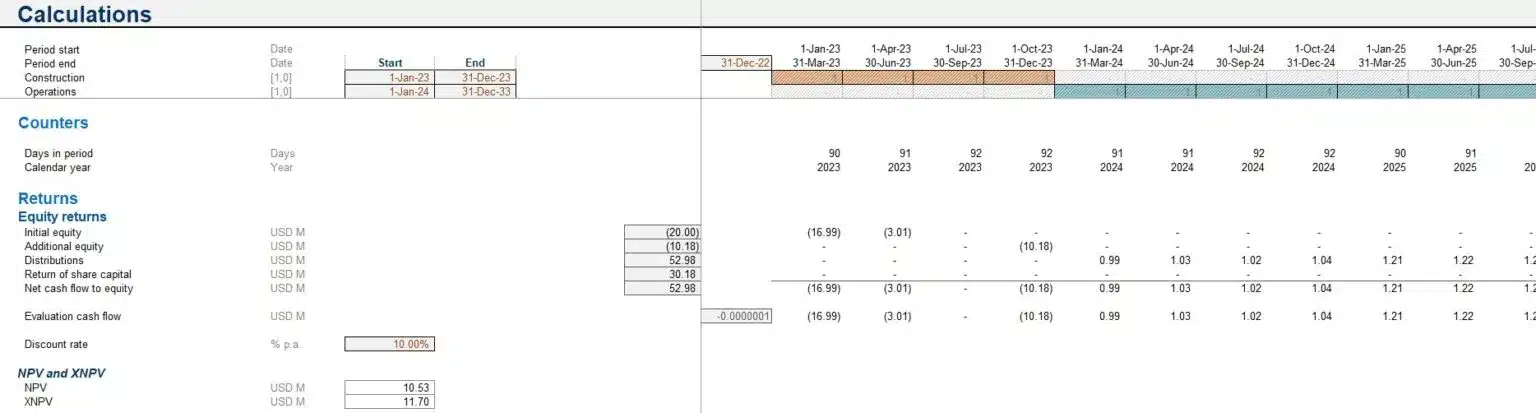
As Figure 2 shows, XNPV() gives US$11.70 million and NPV() a lower US$10.53 million.
The difference comes from NPV() assuming every period has the same number of days. XNPV() discounts each cash flow on its actual date, so it is the more accurate of the two. The difference may still not change the decision.
Checking the NPV calculation
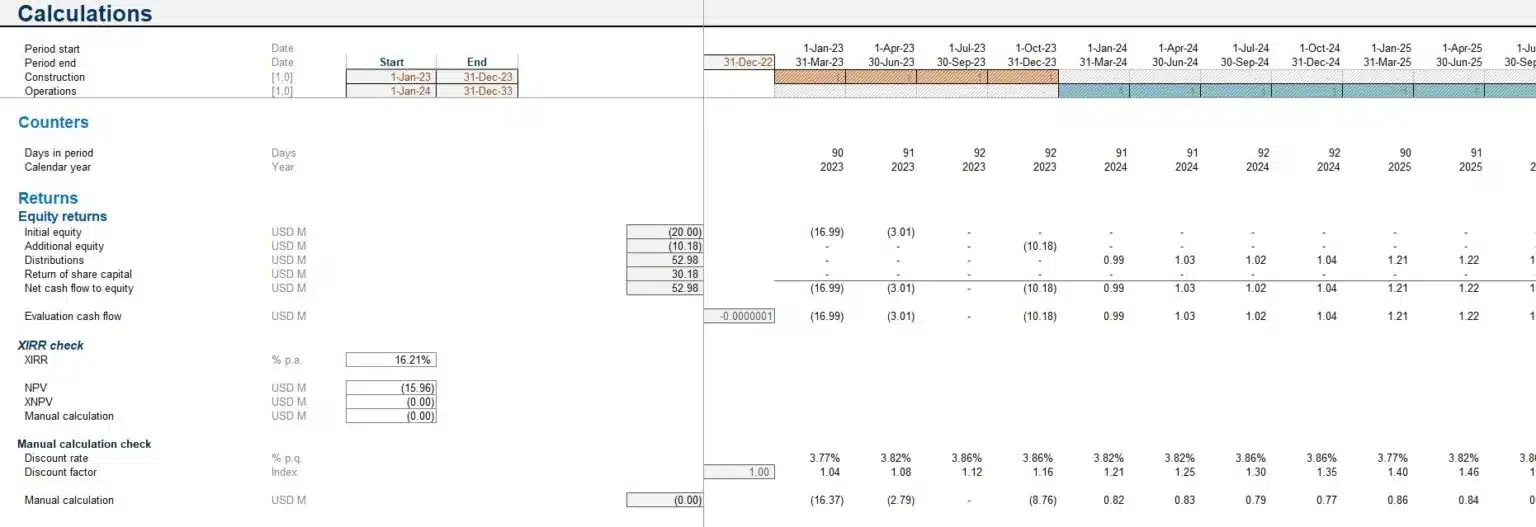
NPV is linked to the internal rate of return (IRR): IRR is the rate at which NPV equals zero. To check an NPV calculation, calculate the IRR first, then use it as the discount rate in the NPV calculation. The result should be close to zero, as Figure 3 shows.
NPV(IRR(…), …) = 0
XNPV(XIRR(…), …) = 0
NPV questions
Should I use NPV() or XNPV() in Excel?
Usually XNPV(). NPV() assumes every period has the same number of days, while XNPV() discounts each cash flow on its real payment date. That matters most in project finance models, where construction is often modelled monthly and operations semi-annually or annually.
What discount rate should I use for an NPV calculation?
Most often the firm’s weighted average cost of capital (WACC). The reinvestment rate, variable discount rates or a firm’s target rate of return can also be right, depending on the project and how much capital is available.
How do I check that an NPV calculation is correct?
Calculate the IRR of the same cash flows, then use it as the discount rate in the NPV formula. IRR is the rate at which NPV equals zero, so the result should come back close to zero if the calculation is right.
Why does NPV differ from XNPV for the same cash flows?
NPV assumes every period is the same length, while XNPV discounts on the actual number of days between dates. Where periods are uneven, such as monthly construction followed by semi-annual operations, the two can differ materially.