Debt repayment tutorial workbook
The case study model from this tutorial, with all three repayment methods behind one switch. Excel binary workbook (.xlsb).
Enter your details and we will email you the workbook.
Loading the form…
The form did not load. Send us an enquiry and we will email you the workbook.
Three debt repayment methods behind one switch
Financiers often need to analyse several debt repayment methods in a project finance transaction, especially during structuring or credit approval. This tutorial shows, step by step, how to build that choice into your financial model so it works dynamically.
The illustration is a case study of a simple project finance model. The tutorial covers the debt repayment only, not the operational side.
Figure 1 shows the input page for the senior facility, with the repayment methods the model will offer.
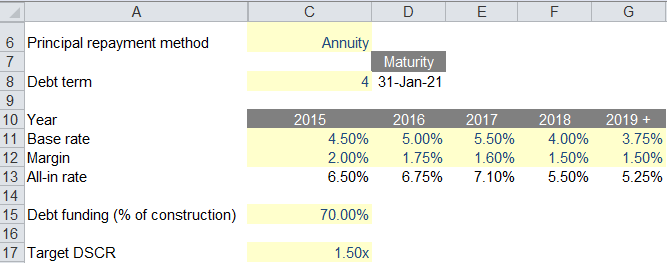
The financiers want to switch between these repayment methods for the senior facility, using the drop-down in cell C6:
- Annuity (credit foncier, or equal principal and interest)
- Equal principal (straight line, equal principal repayments)
- Repayment profile (the user enters a percentage repayment profile)
The challenge is to model all three transparently while a single switch (C6) activates one of them. When the switch is set to annuity, the annuity repayment is active in the model.
When the percentage profile is selected, the user enters the repayment profile (figure 2) before it is used in the calculation.

Learn this in a room
Advanced Project Finance Modelling
Debt sizing, covenant monitoring, DSRAs and integrated three-way statements. Hands-on, practitioner-led training, in person or online. See dates and book.
Modelling debt repayment in five steps
Step 1: build the senior debt facility account
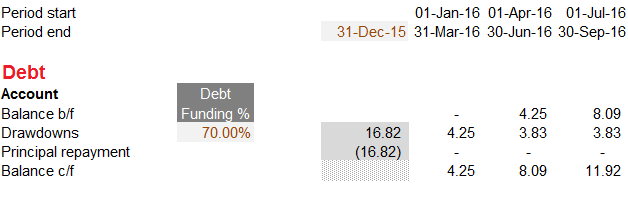
First build the debt account for the senior facility, as in figure 3. Leave the principal repayment line empty for now.
Step 2: model the interest payment
Next, model the interest payment on the debt (figure 4). The formula is:
Interest=% per quarter × debt balance b/f

Step 3: model the repayment under each method
Then model the debt repayment under each of the three methods.
Annuity repayment schedule
If you have coded an annuity repayment for a debt facility before, this will be familiar. Figure 5 shows our preferred formula for the annuity instalment. The interest payment links to the line calculated in step 2.

Equal principal repayments
Figure 6 shows how to model the repayment for the equal principal (straight line) method.

Percentage repayment profile
Figure 7 shows the third method, the percentage repayment profile.

Step 4: pick the selected repayment
This is the main step: bring the repayments from step 3 together and pick the one the switch selects.
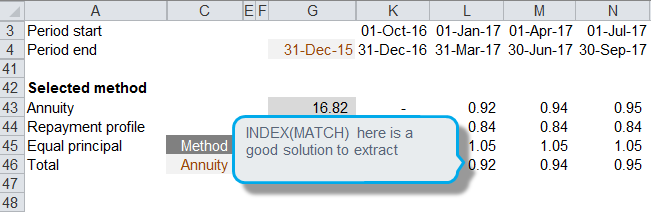
- Cell C46: link the switch for the selected method from the inputs (annuity in this example)
- Rows 44 to 45: bring in the debt repayment under each method
- Row 46: use INDEX(MATCH()) to match the method selected in C46 with its repayment label, then use the result to index the right repayment row
Step 5: link the applied repayment to the debt account
Finally, link the applied repayment to the debt facility account from step 1.