Data exported from accounting, sales or product systems sometimes arrives with custom Excel number formats. Usually you can change them to whatever you prefer. The exception is when the format holds information you need.
When the currency sits only in the number format
In the example below, the export gives each product value as a number. The currency appears only in the custom number format, with a different format for each currency: Product A is in CAD and Product B is in GBP.
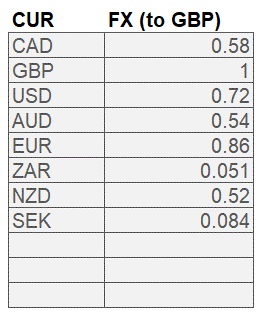
The aim is to extract the currency code (CAD, GBP and so on) into its own column, CUR. That column then drives the FX lookup, to give a final value in GBP or whichever currency you report in.


Why the CELL function does not work here
The option most often suggested for reading a cell’s number format is the CELL function. It has a clear limit with custom number formats that use a different currency in each cell, whether they were set by hand or by the system that exported the data.

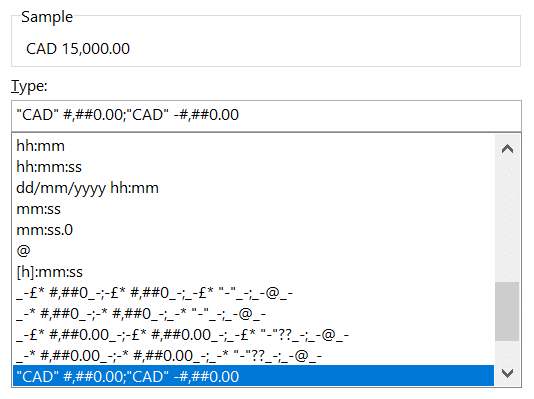
Applied to our custom format, CELL returns “,2”. That tells us nothing about which currency the cell uses.
For more on custom number formats, see How to speed up your models, part 3.
A VBA function to extract the currency
A user defined function (UDF) in VBA can extract the currency in three steps:
- Read the full custom number format as text with the cell’s NumberFormat property. It returns something like “CAD” #,##0.00;”CAD” -#,##0.00.
- Trim the text with MID so only the currency code is left.
- Return the currency code to the worksheet as a string.
If you have not written a UDF before, Microsoft’s support pages include an introduction to creating custom functions in Excel. For our training, see our financial modelling courses.
You could do the FX lookup in VBA too. For transparency we recommend keeping the VBA to a minimum and leaving most of the logic in Excel, where a reviewer can see it.
Function ExtractCurrency(FormattedCell As Range) As String
'This function extracts the number format from Currency formatted cells (CAD/GBP/USD, etc)
'Useful in the specific situation where DIFFERENT formatting codes have been used in a range
Dim strNumberformat As String
Dim strNumberformatClean As String
    'pick up the numberformat from the Cell property
    'should read something like ""CAD" #,##0.00;"CAD" -#,##0.00"
    strNumberformat = FormattedCell.numberformat
    'Clean up the string
    strNumberformatClean = Mid(strNumberformat, 2, 3)
    'Alternative (step-by-step) approach for debugging
    'strNumberformatClean = Left(strNumberformat, 4)
    'strNumberformatClean = Right(strNumberformatClean, 3)
    'Return the extracted currency code to the active cell
    ExtractCurrency = strNumberformatClean
End Function
Completing the conversion with XLOOKUP
Once the currency code is in its own column, the rest is straightforward. The simplest and most modern way is an XLOOKUP against an FX table. INDEX and MATCH work just as well if you prefer them.
Be careful with LOOKUP: it needs the data sorted. If someone later adds a currency to the table out of order, the lookup returns the wrong rate without any warning. For more on LOOKUP against VLOOKUP and HLOOKUP, see Use LOOKUP to replace VLOOKUP and HLOOKUP.